(This is part of a weekly feature called Slice of Life Project)
Yesterday marked the first day of the Claymation Animation Camp that I run in partnership with the Western Massachusetts Writing Project and the local vocational high school (as part of their summer enrichment program). I have 15 middle school students and they are so cool, and so eager to learn about moviemaking and technology. I am also fortunate to have a co-teacher (shout out to you, Tina) and a visiting teacher who just wants to learn more about claymation for her school (Maria).
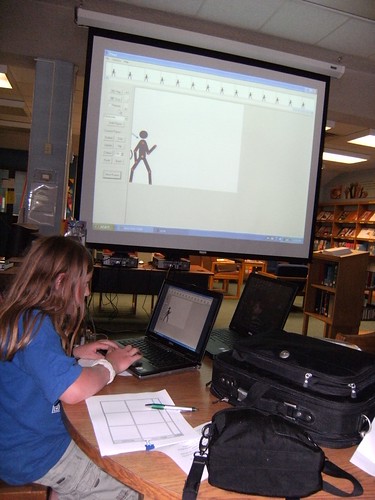
We started off the day with a talk about animation and then launched into a morning of hands-on work with Pivot Stick Figure software, which they just eat up. I showed a few how to use MovieMaker to create titles and do some editing and we will be using it more extensively today. They were just working so hard, and being so creative, it was quite a joy to just be in the room with them. This picture shows one of my students working on a movie with the laptop hooked up to the LCD screen and I loved the image.
Here is one little movie by a boy who was one of my students this past year. The title is longer than the movie, which can be typical at this juncture, particularly with Pivot.
Meanwhile, I followed the lead of a new blogger friend, TJ Shay, who has been espousing the virtues of an animation program called Animation-Ish and he is encouraging folks to download a free version of the program and give it a try. I did. And I gave it a try. I wasn’t quite impressed on the initial look. It has a nice interface, but the software seemed very simplistic in what you can do and not all that intuitive to use, in my opinion. I did like that you can draw your own pictures and the move them around. That is cool. I’m not making a final judgment on the software, just an initial reaction. It does not seem to be worth $60, however.
Here is a quick movie that I made:
TJ suggested I try the more advanced function of the program (there are three different levels for different age and experience levels of students), which I did, and again, I did find it all that intuitive or easy for me to use. I checked out the website for more help or at least ideas, but it appears to be under construction and the one tutorial did not do much to help me out. I don’t know. My feeling with software is that if I can’t see the “wow” in it or get my hands right into the act of creation within a short period of time, I don’t see how it will engage my students, particularly if it costs me something.
Peace (in frames),
Kevin
Kevin, you probably have a virus scan running all the time. I do. When I click on the link to your site today, my computer warns me that a trojan horse virus is attached to your site. My husband is not home to make sure it is actually your computer. He does computer’s for a living. I hope I am not offending you. Your site is awesome. I always appreciate your posts. deb
Kevin,
I can’t view any of the animation but I would so love to have my daughter in a class with you!
~jane
Hi, Kevin– I love that you are always up for trying something new … and sharing it with us. And thanks, also, for emailing me ages ago with your offer of advice. As soon as I know what the lay of the land is at work, I’ll get back to you!
–Stacie
Hi Jane
Are you using Explorer? Edublogs is having some difficulties with video and explorer and I keep hoping they figure it out, since that (obviously for me and this kind of post) is a problem.
Deb
Your post is worrisome. A trojan horse? If that is the case, can you please let me know so that I can get in touch with Edublogs and figure it out.
Kevin
Kevin,
Thanks for taking the time to check out Animation-Ish. I am not sure what is available with the online download, but just wanted to let everyone know that there are nine on-line lessons that guide the learner through the program. The lessons will be growing as time goes on. I started the Beta-test in November without any instructions and I was able to create a lot of simple animations. I learned some of the advanced features with the online lessons that come with the Educator Edition.
I had kids from second grade through twelfth grade create animations using this software (examples are on my blog) and all of them only had a 10-15 minute introduction. Give it another chance and/or let kids play with it. It is a very simple interface, but it does great things. My blog today has an animation from a 7 year old in another state! I love that!
Thanks for the mention. I love watching what people can create with this tool and others. Really like the claymation! Your students are lucky to have that experience.
Wow! I think it is so great that your students are able to learn all about animation. Sounds fun. You are an inspiration to all of us with the variety of talents you have and share with people.